Projects
Here is a more comprehensive look at the projects I have developed:
mgit
A powerful CLI tool written in Go designed to manage and execute commands across multiple Git repositories simultaneously. It streamlines multi-repo workflows, saving time and context-switching for developers dealing with microservices or distributed codebases.
mgit - Multi-Repository Git Management Tool
mgit is a command-line tool for managing and executing commands across multiple Git repositories simultaneously.
Download
Download the latest version from the Releases page.
Install on Linux
App Binary
chmod +x mgit
sudo mv mgit /usr/local/bin/mgit
Shell Completion
Bash/Zsh/Fish (Linux)
sudo mv <mgit_completion> /etc/bash_completion.d/<mgit_completion>
source /etc/bash_completion.d/<mgit_completion>
Install on MacOS
App Binary
chmod +x mgit
sudo mv mgit /usr/local/bin/mgit
Shell Completion
Zsh (macOS)
mkdir -p ~/.zsh/completions
mv <_mgit> ~/.zsh/completions/
echo 'fpath+=~/.zsh/completions' >> ~/.zshrc
autoload -Uz compinit && compinit
Install on Windows
App Binary
Move-Item mgit.exe "$env:USERPROFILE\bin\mgit.exe"
# Ensure $env:USERPROFILE\bin is in your PATH
Shell Completion
PowerShell temporary use
go run ./ completion powershell > mgit_completion.ps1

. .\mgit_completion.ps1 # for temporary use
Build from source (requires Go to be installed)
Build Binaries
Linux/macOS
cd mgit
go build -o mgit
chmod +x mgit
sudo mv mgit /usr/local/bin/mgit
Windows (PowerShell or CMD)
cd mgit
go build -o mgit.exe
Move-Item mgit.exe "$env:USERPROFILE\bin\mgit.exe"
# Ensure $env:USERPROFILE\bin is in your PATH
Completion
bash
mgit completion bash > mgit_completion.bash
zsh
mgit completion zsh > mgit_completion.zsh
fish
mgit completion fish > mgit_completion.fish
powershell
mgit completion powershell > mgit_completion.ps1
Usage
Add repositories/projects
# Add a new repository to current project
mgit add repo --path <full-path> #name of the repository is automatically sourced from the end of the path

mgit add repo --path <full-path> --name custom-name

# Add a new project
mgit add project --name <project-name>
Delete repositories/projects
# Delete a repository from current project
mgit delete repo <repo-name>

# Delete a project
mgit delete project <project-name>
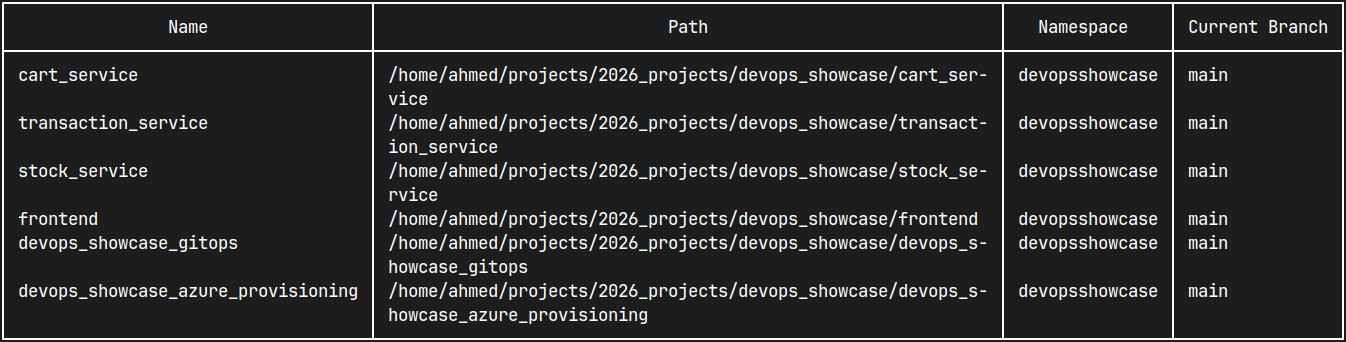
List repositories
# List repositories in current project
mgit list

# List repositories in a sepecified project
mgit list --project name

# List repositories in all projects
mgit list --all
Switch between projects
mgit switch <project-name>
Execute commands on repositories
mgit exec repo1 repo2 repo3 -- command
mgit exec -- command
Examples
- Add repositories to your workspace:
mgit add repo --path /home/username/projects/project1 mgit add repo -p /home/username/projects/project2 - Create and switch to a new project:
mgit add project work-projects mgit switch work-projects - Check status of specific repositories:
mgit exec project1 project2 -- git status - Pull latest changes from all repositories in current project:
mgit -- git pull - List all tracked repositories across projects:
mgit list --all
Configuration
mgit uses a SQLite database to store your repository information and projects. The database is automatically created at ~/.mgit as db.sqlite on first run.
It also keeps track of the current project in ~/.mgit/config.json
Contributing
Contributions are welcome! Please open an issue or submit a pull request for any improvements or bug fixes.
License
This project is licensed under the Apache-2.0 License - see the LICENSE file for details.
devops_showcase
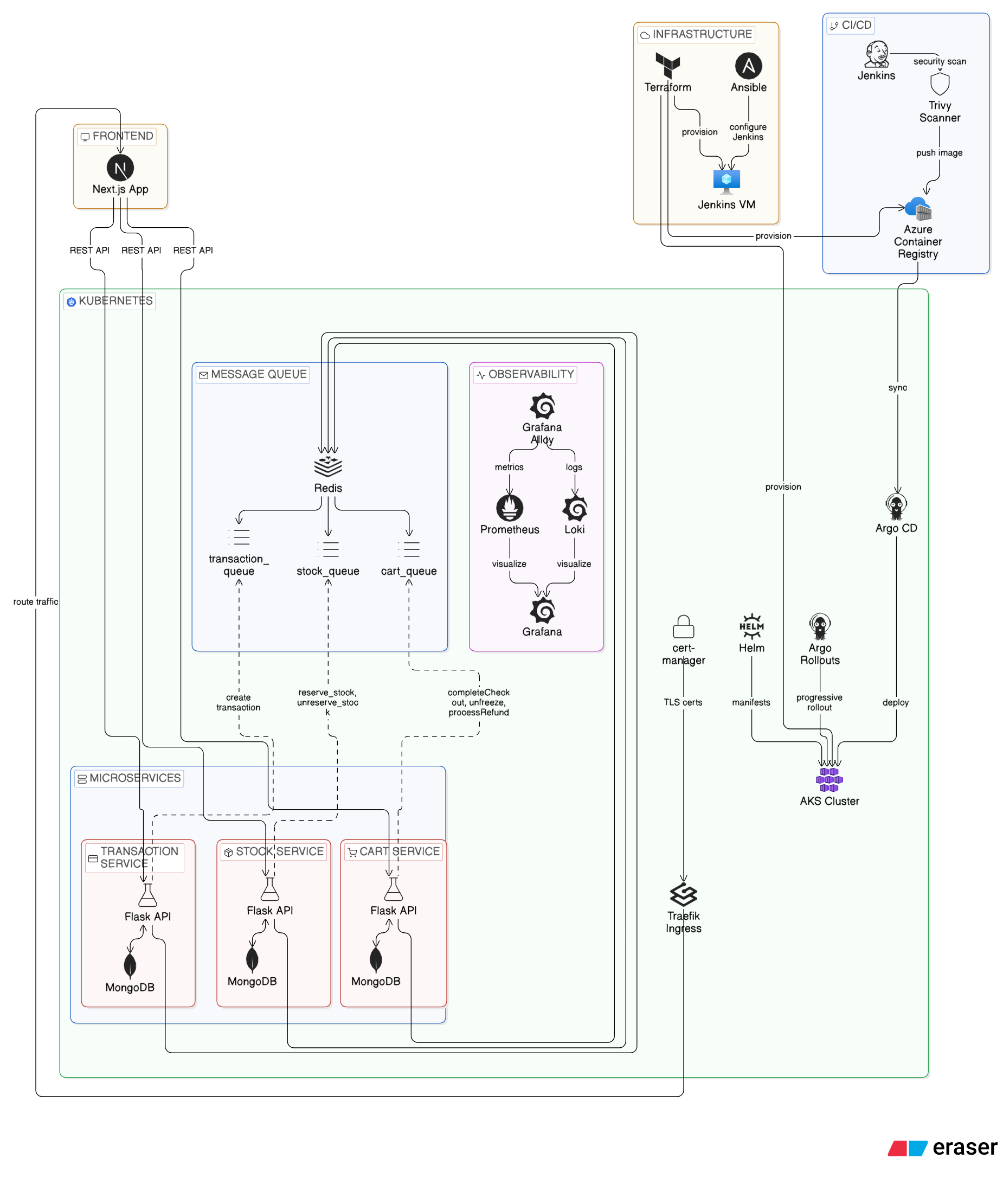
A cloud-native microservices e-commerce platform deployed on Azure Kubernetes using Terraform, Jenkins CI/CD, and ArgoCD GitOps workflows with full-stack monitoring.
DevOps Showcase
Architecture Overview
Microservices
Technologies: Python, Flask, MongoEngine, Celery, Redis.
Technologies used in Jenkins pipeline: Docker, Trivy, Azure Container Registry
| Name | Repository | What it is for |
|---|---|---|
| Cart Service | devops_showcase_cart_service | Manages carts, cart items, and checkout state. |
| Stock Service | devops_showcase_stock_service | Manages products and inventory operations. |
| Transaction Service | devops_showcase_transaction_service | Manages transaction creation and transaction status updates. |
These microservices communicate with each other using Celery tasks over Redis queues.
Frontend
| Name | Repository | What it is for | Technologies |
|---|---|---|---|
| Frontend | devops_showcase_frontend | User-facing web application that drives the full flow across services. | TypeScript, React, Next.js,Jenkins (pipeline contains: Docker, Trivy, Azure Container Registry) |
GitOps
| Name | Repository | What it is for | Technologies |
|---|---|---|---|
| GitOps | devops_showcase_gitops | Contains Kubernetes bootstrap and deployment manifests/charts. | Kubernetes, Helm, Argo CD, Argo Rollouts, Traefik, cert-manager, Prometheus, Grafana, Loki, Grafana Alloy |
Provisioning
| Name | Repository | What it is for | Technologies |
|---|---|---|---|
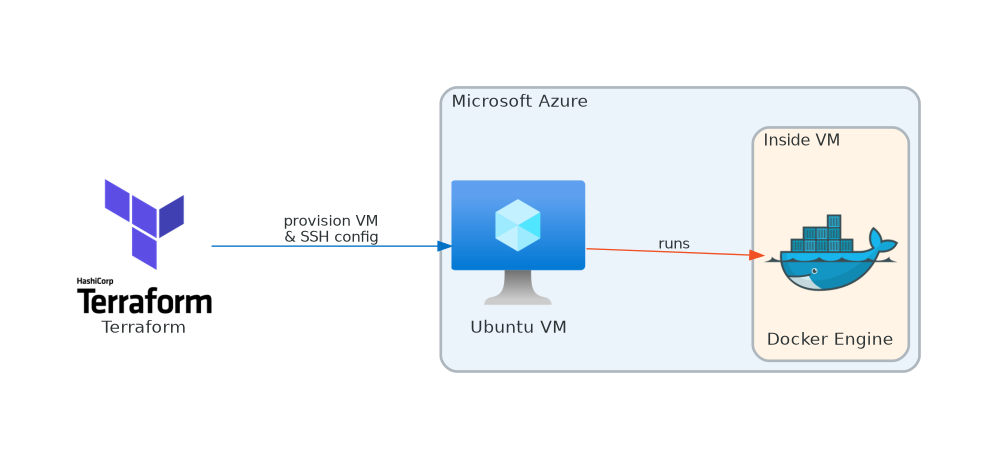
| Azure Provisioning | devops_showcase_azure_provisioning | Contains Terraform and Ansible automation for infrastructure provisioning and Jenkins setup. | Azure, Terraform, Ansible, Ansible Vault, Jenkins, Docker, Azure Kubernetes Service (AKS), Azure Container Registry (ACR), Azure Virtual Machines |

deploymentnote
A simple cli tool to add notes to deployments in case you want to access some info fast.
DeploymentNote
a simple cli tool to add notes to deployments in case you want to access some info fast

Prerequisites
- Go: Version 1.16 or higher.
- Kubernetes: A working Kubernetes cluster with
kubectlinstalled and configured. - Sudo Privileges: Required for system-wide installation.
Installation
Follow these steps to install DeploymentNote system-wide:
-
Clone the Repository:
git clone https://github.com/yourusername/deploymentnote.git cd deploymentnote -
Build the Binary:
go build -o deploymentnote -
Make the Binary Executable:
chmod +x deploymentnote -
Move the Binary to
/usr/local/bin(requires sudo):sudo mv deploymentnote /usr/local/bin/ -
Generate the Bash Completion Script:
go run ./ completion > deploymentnote_completion -
Install the Completion Script (requires sudo):
sudo mv deploymentnote_completion /etc/bash_completion.d/deploymentnote -
Reload Bash Completions:
source /etc/bash_completion.d/deploymentnote
Usage
Once installed, simply run deploymentnote
Commands Overview
Both adding and deleting notes supports autocompletion of deployment name
-
Show Deployments:
Running
deploymentnotewithout any subcommands displays a table of deployments with available custom notes:deploymentnote -
Add a Note:
deploymentnote add deployment_name "write note here" -
Delete a Note:
deploymentnote delete deployment_name
Configuration
-
Custom Data File:
DeploymentNote uses a JSON file at
/tmp/custom_values.jsonto store and retrieve custom notes. You may edit this file manually if needed. -
Kubernetes Integration:
Deployment data is fetched via the command
kubectl get deployments. Ensure yourkubectlcontext is correctly set for your target cluster.
If you'd like to see more please visit my GitHub repositories.